A
One board, every thread
Wrangler joins each Linear ticket to its GitHub PR, its CI runs, and its rollout state — one reconciled row per feature instead of four half-truths in four tools.
Eyes on every agent
Wrangler is the control tower for engineers running a fleet of coding agents — tickets, PRs, CI, and Slack reconciled into one board. When a session finishes, Wrangler runs your tests, lint, and typecheck in the worktree — the row goes green only when it's actually green.
✓ Free forever coreNo account, no cardYour code never leaves your machine
●3 agents working ●1 waiting on you ● 0 surprises
Plays nice with the stack you already run
01 / The stampede
Parallel coding agents multiplied your output — and your surface area. Now every feature is a ticket in Linear, a PR on GitHub, a CI run somewhere, and a thread in Slack. None of them agree, and one of your agents has been quietly waiting on you for forty minutes.
Each glance costs a context switch. Each context switch costs the thing you actually sat down to do.
unreconciled · 7 signals · 4 tools
LIN-482 · In ProgressPR #1291 · review requestedCI ✗ failed — flaky again?#eng-alerts: “deploying?”agent-3: awaiting approvalPR #1287 merged… which ticket?agent-1: still working (12m)02 / The control tower
One row per feature — ticket, PR, CI, and rollout reconciled into a single status. One rail for your agents — and the moment any session stops for a permission or a question, it jumps into the real-time “Needs you now” queue above the board, longest-waiting first.
03 / The daily loop
Wrangler doesn't replace your agents or your subscriptions — it sits above them. Bring the tools you already pay for; it handles the orchestration, the isolation, and the interruptions.
GitHub via your existing gh login or a token; Linear or Jira for tickets; Slack, Coralogix, and LaunchDarkly if you use them. Tokens go straight into the OS keychain — they never touch the webview and only ever travel to each service's own host.
gh auth ✓ · linear ✓ · slack ✓
Browse your Linear tickets right in the composer — or paste a ticket URL, a Slack thread, or just describe the work. Wrangler assembles the context, creates an isolated git worktree for the branch, and opens a live agent session — Claude Code, Codex, Cursor, Gemini, OpenCode, and 30 more.
worktree: lin-421-export-v2
Agents grind in the background — detached sessions even survive quitting the app. A chime and a native notification fire the moment one finishes or needs input, and the "Waiting for me" inbox ranks what's blocked on you, most urgent first.
● agent done · needs review
Read the diff the agent produced, attach line comments, and send them back as one batch. CI failed? One click dispatches a fix to the session that owns the PR. Then sweep the Review queue — every open PR in one keyboard-first pass — and the board goes green only when the verification checklist does.
review → fix → verify → ✓
04 / In the field
Not mockups — screenshots straight from Wrangler's own walkthrough suite. This is the tool we use to build the tool.
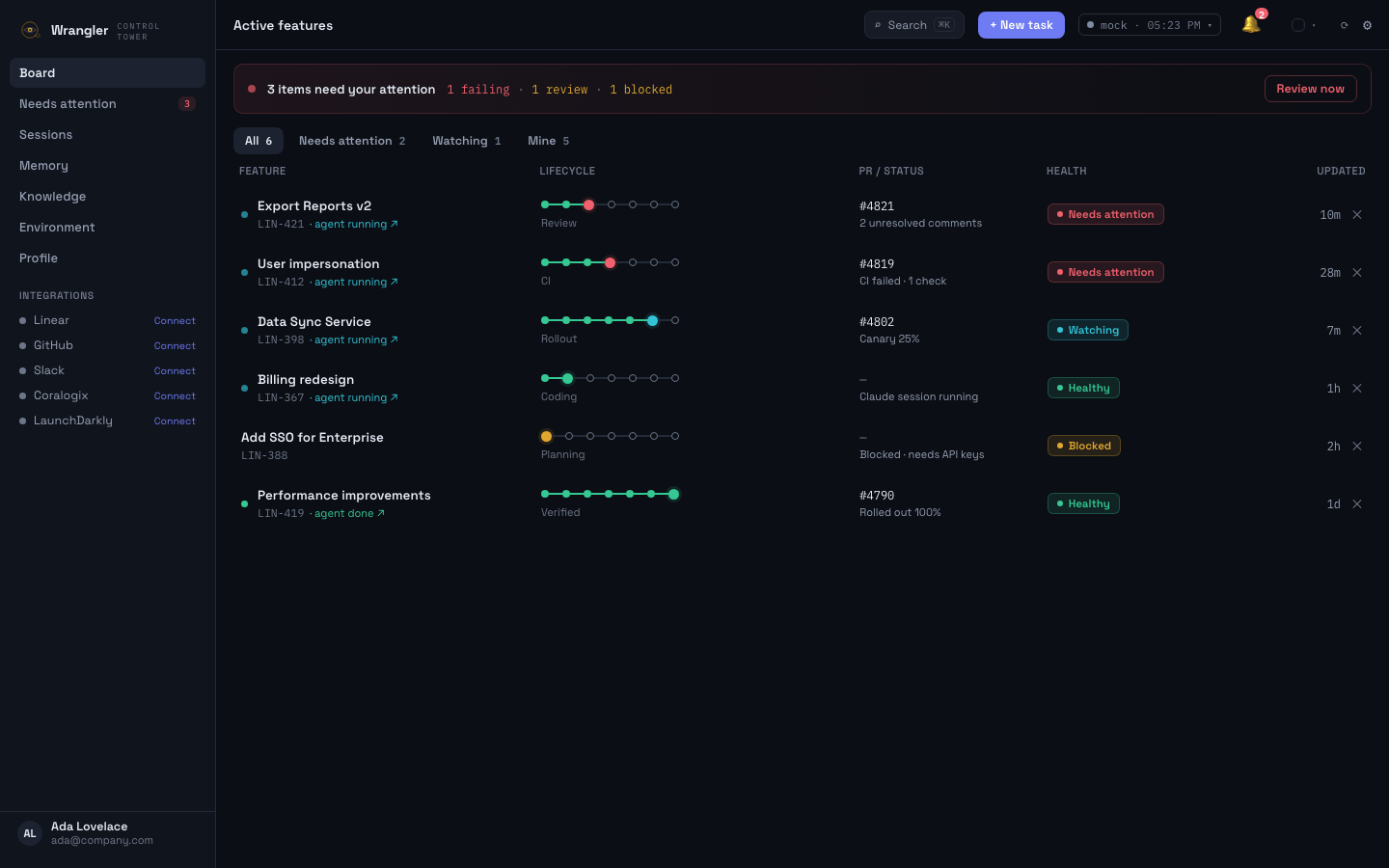
The board
One row per feature: the Linear/Jira ticket, its PRs and CI, the rollout stage, and a single honest health status — reconciled automatically from all your tools. The red strip on top counts exactly what needs you.
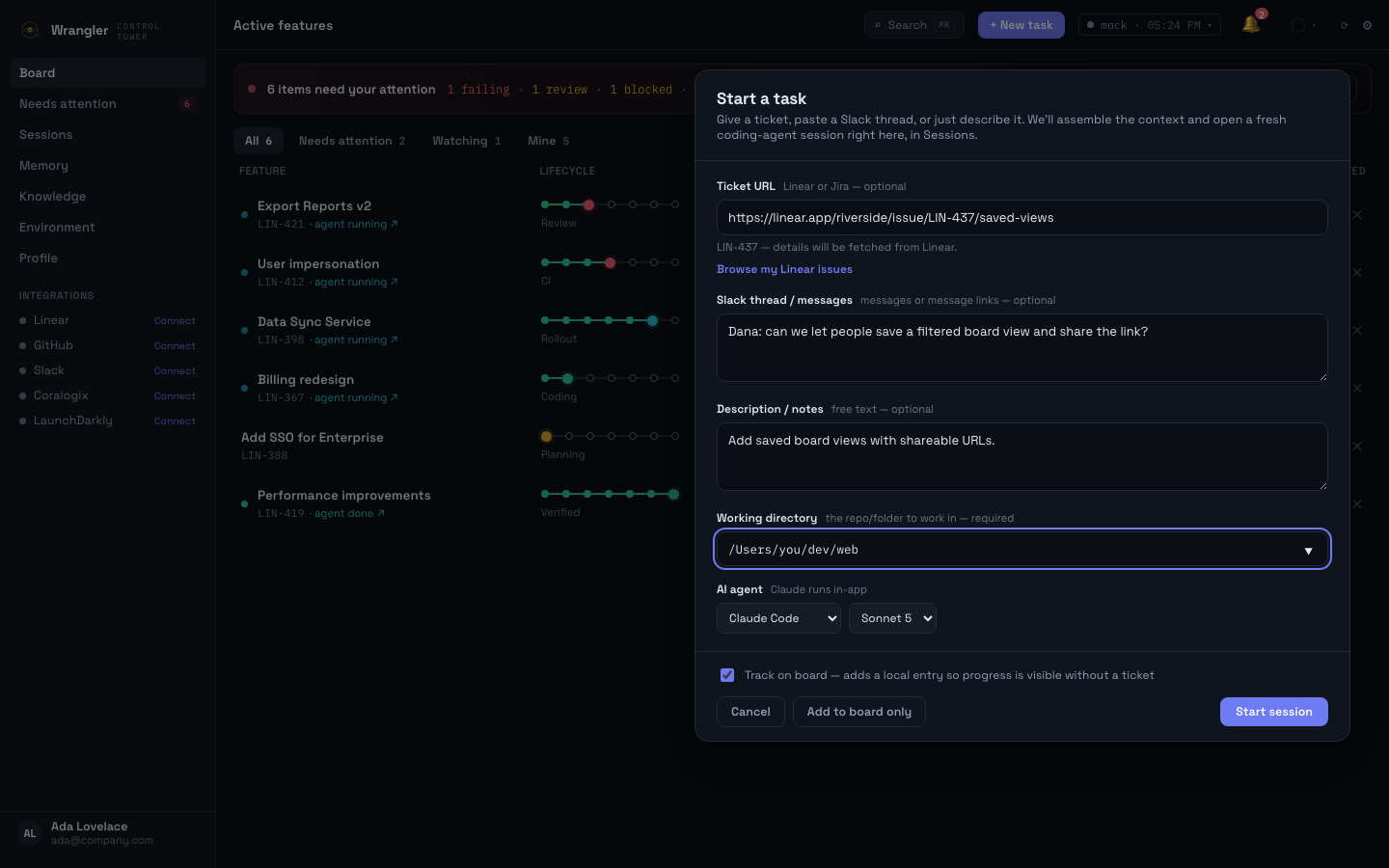
Start a task
Point it at a Linear or Jira ticket, paste the Slack conversation that kicked things off, pick the repo, pick the agent and model — Wrangler assembles the full context, spins up an isolated git worktree, and starts the session.
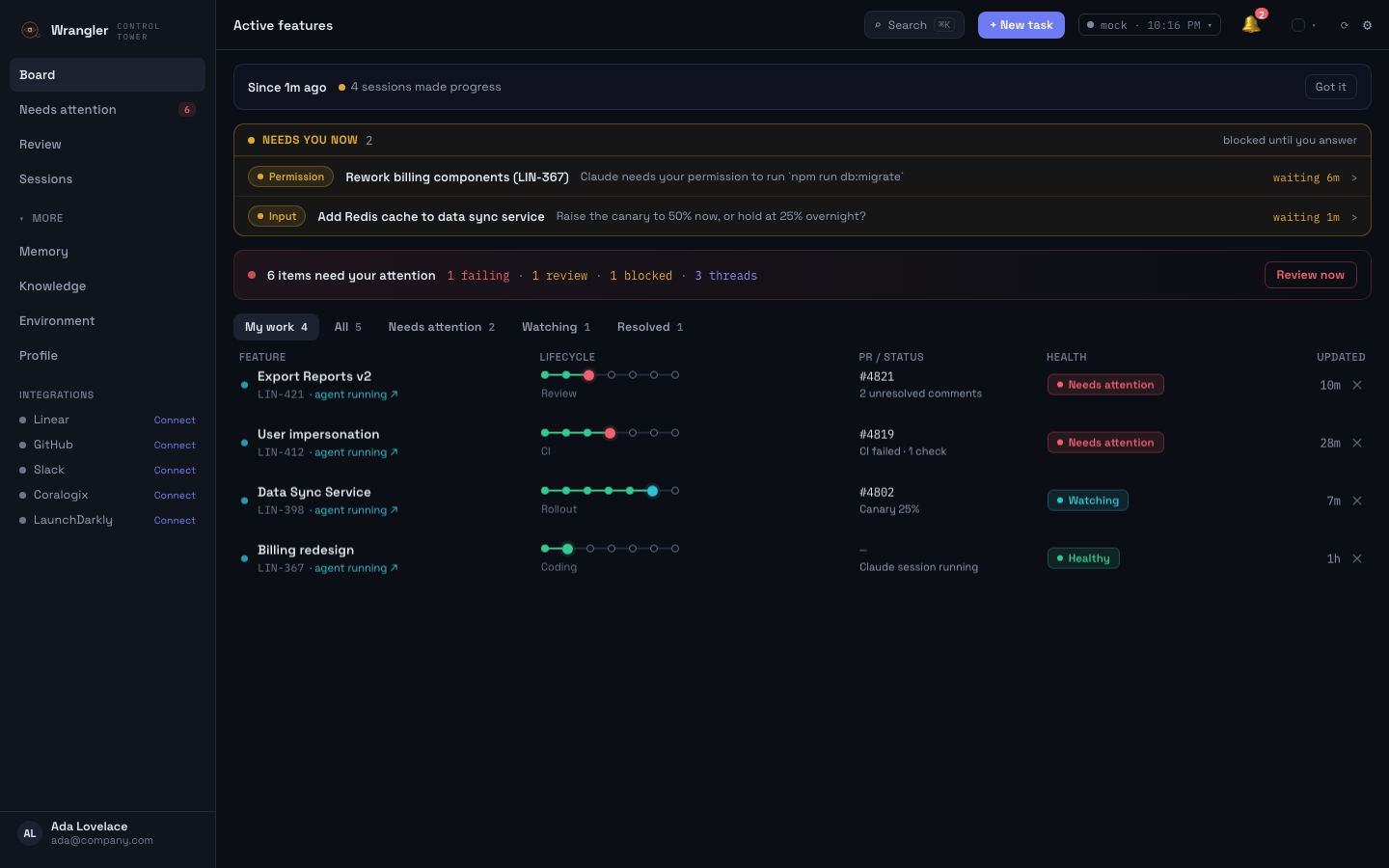
Needs you now
The moment any session stops for a permission or a question, it surfaces in a strip above the board — longest-waiting first, with a live age and the exact thing it's waiting on. One click opens that session. When nothing is stuck, the strip doesn't exist.
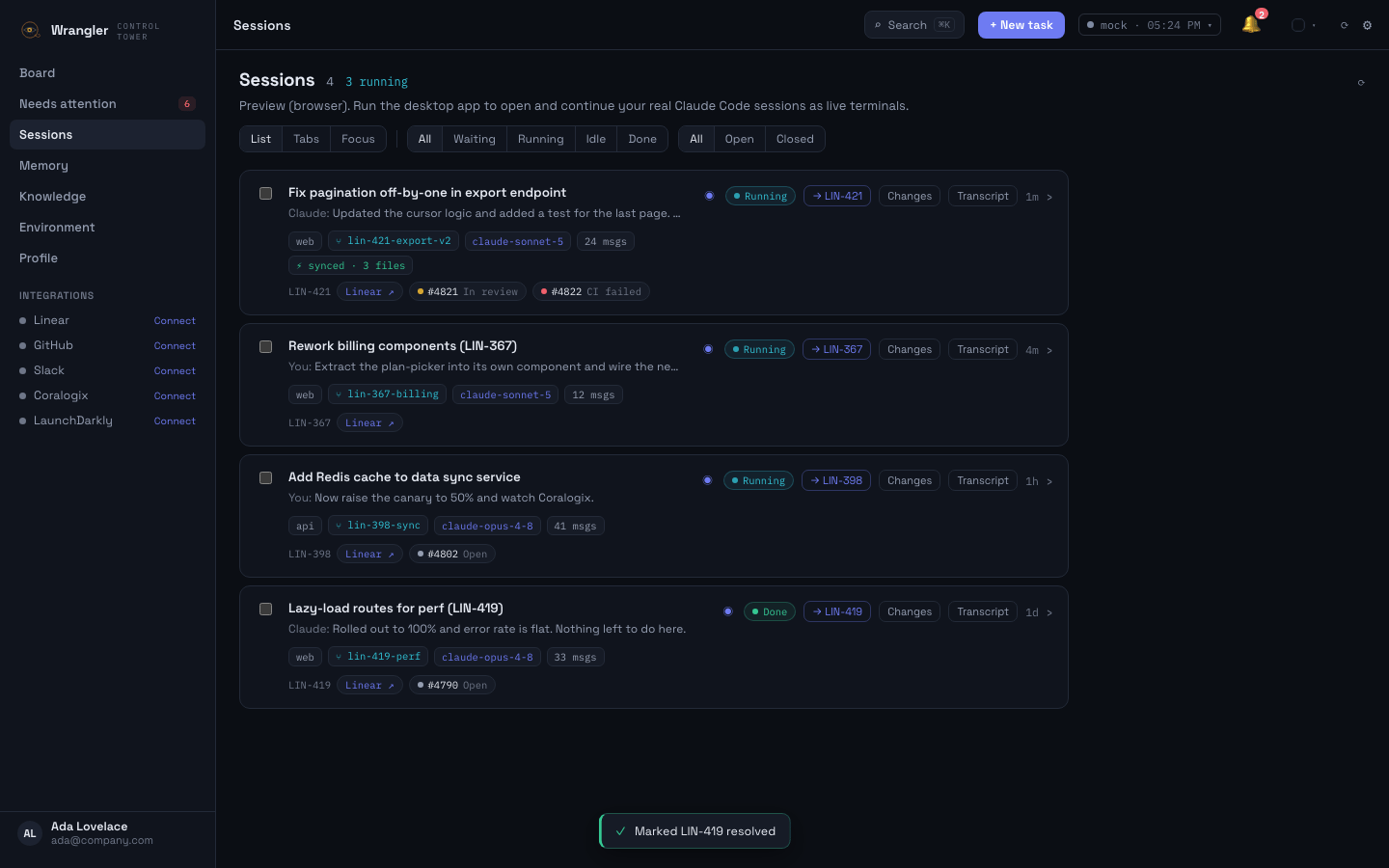
Sessions
Every agent session — even ones you started in a plain terminal — with its live status, its branch and how far it's fallen behind main, clickable localhost badges for every dev server it started, and its linked ticket and PRs. Open any of them as a real terminal, right in the app.
Inside a session
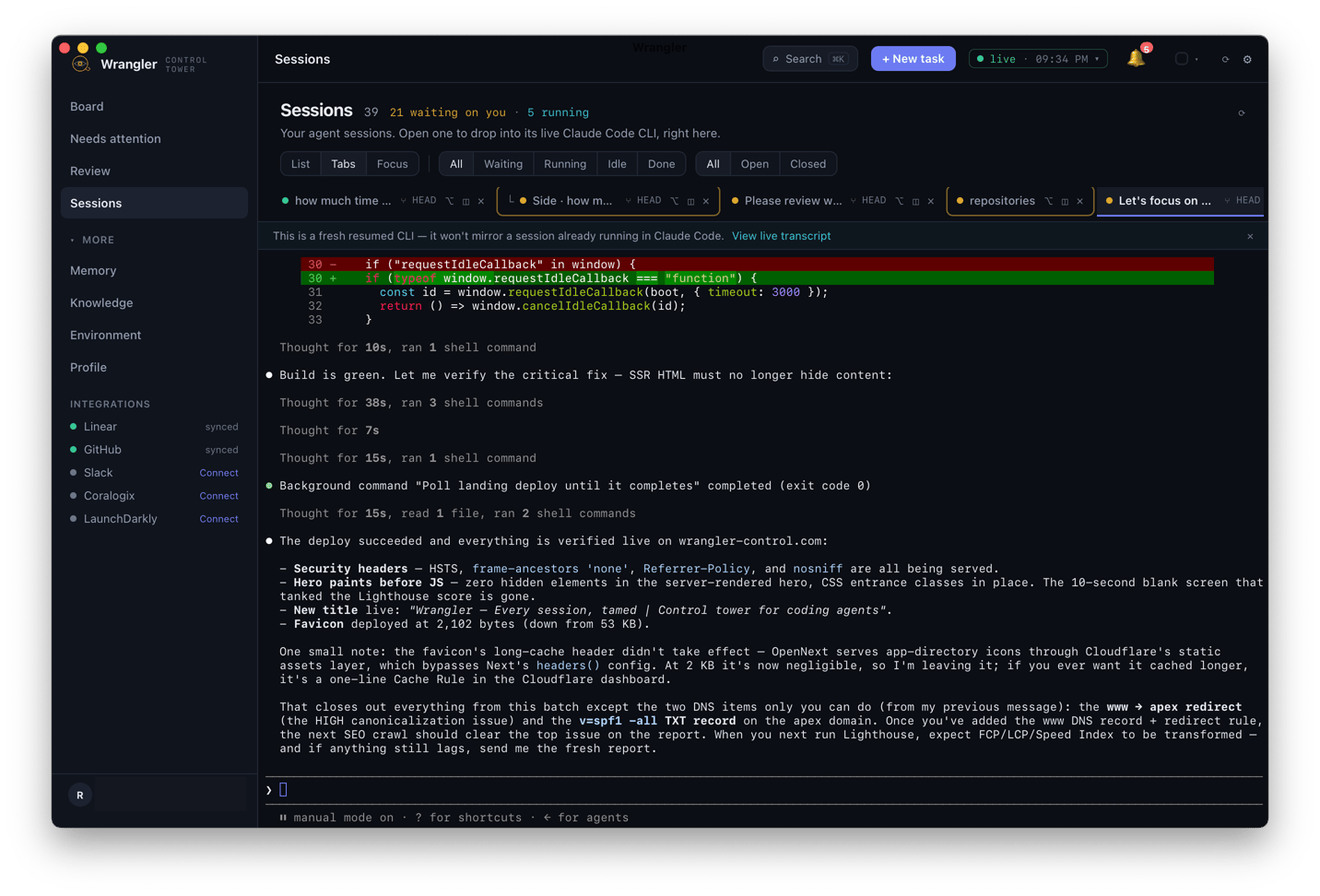
Open any session and you're in its real Claude Code terminal — diffs, thoughts, and shell commands streaming live, with the rest of your fleet one tab away. Resume it, answer it, or just watch it work; nothing is a mirror or a replay.
Review queue
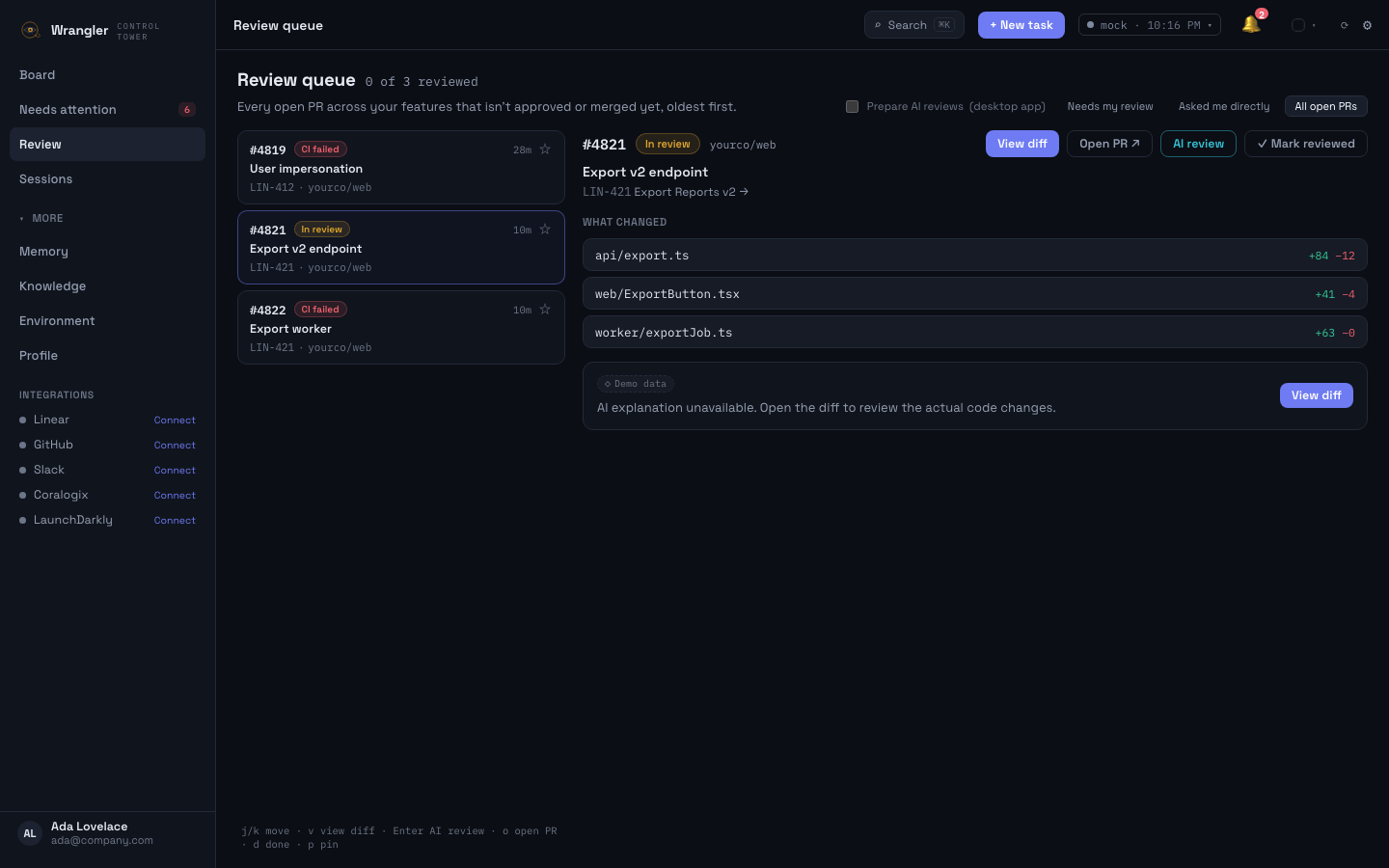
Every open PR across every feature, one flat queue, oldest-waiting first. j/k to move, Enter for an AI review, o to open the PR, d to mark it reviewed — a mark that expires by itself when the head commit changes. The sidebar badge tells you when the queue needs another pass.
Needs attention
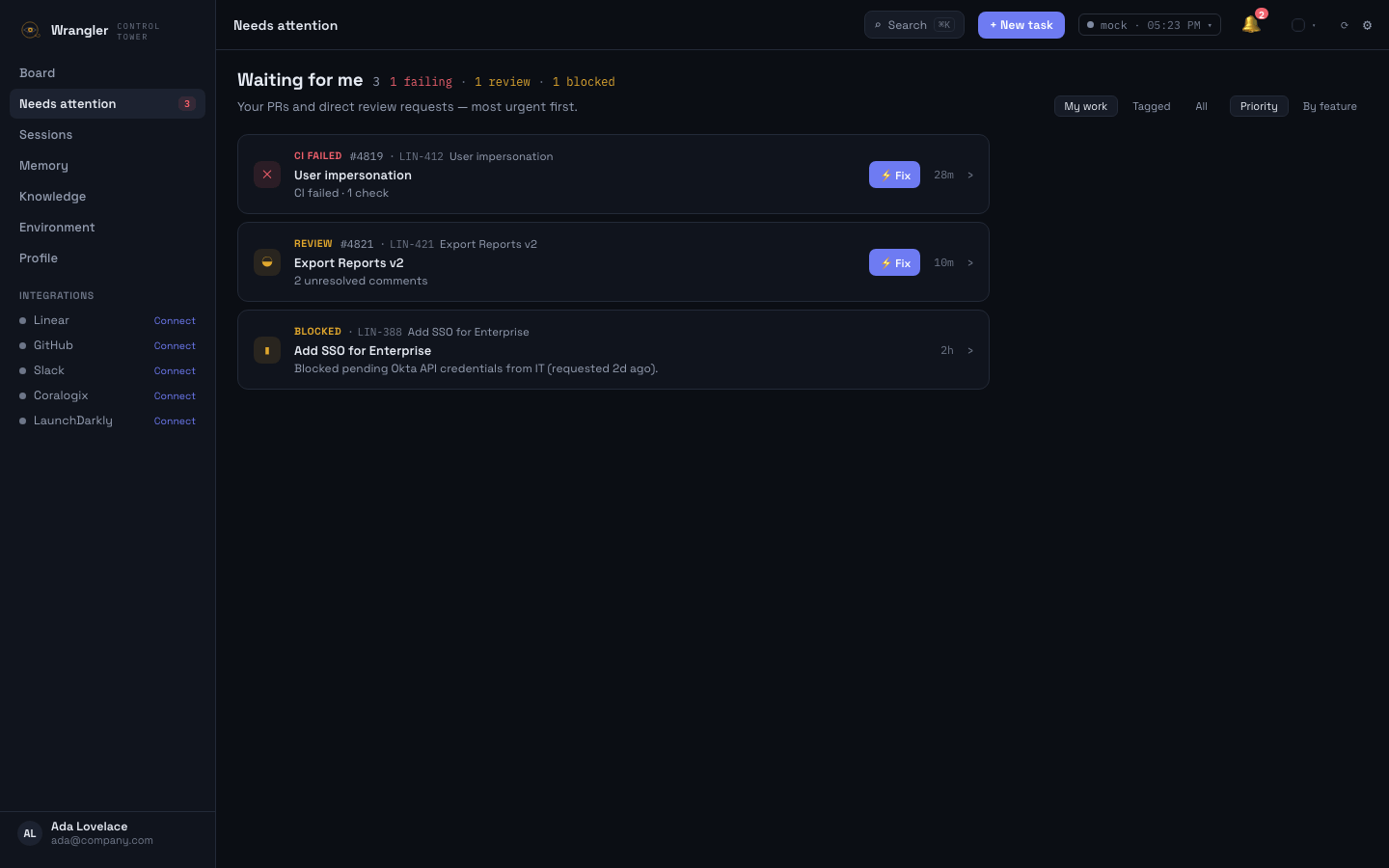
Failing CI, review comments, blocked work — ranked by urgency, scoped to what's actually yours. Each item carries a one-click action, so clearing the queue takes a minute, not a context switch.
Review changes
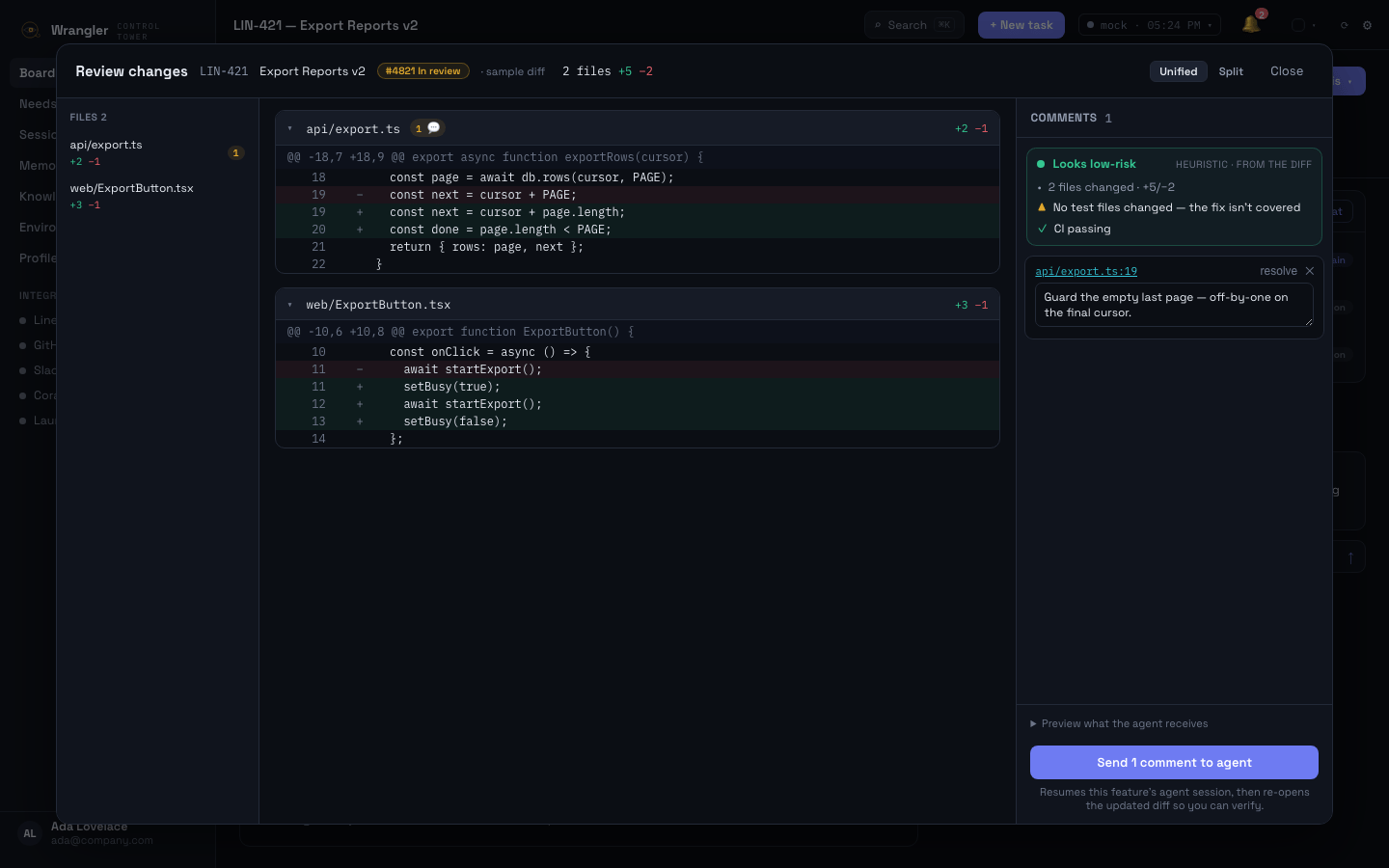
Inspect exactly what the agent changed, attach comments to lines across files — they collect in a pending panel — and send them all back as one structured instruction. The updated diff re-opens when the agent is done, so you verify — you don't hope.
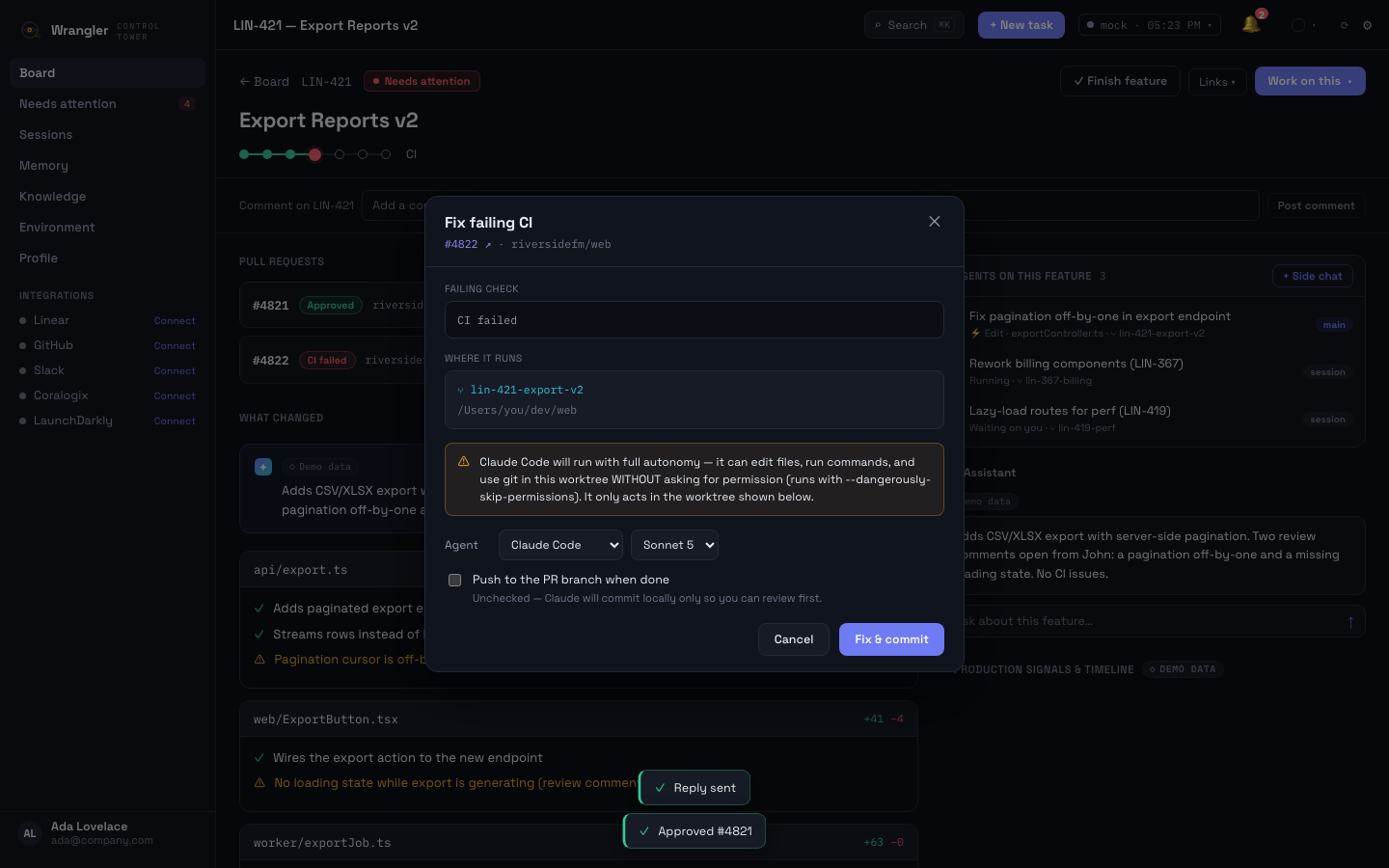
One-click fix
The ⚡Fix button hands the failing check to the agent session that owns the PR — in its own worktree, with the autonomy level disclosed up front and push off by default so you always review before anything leaves your machine.
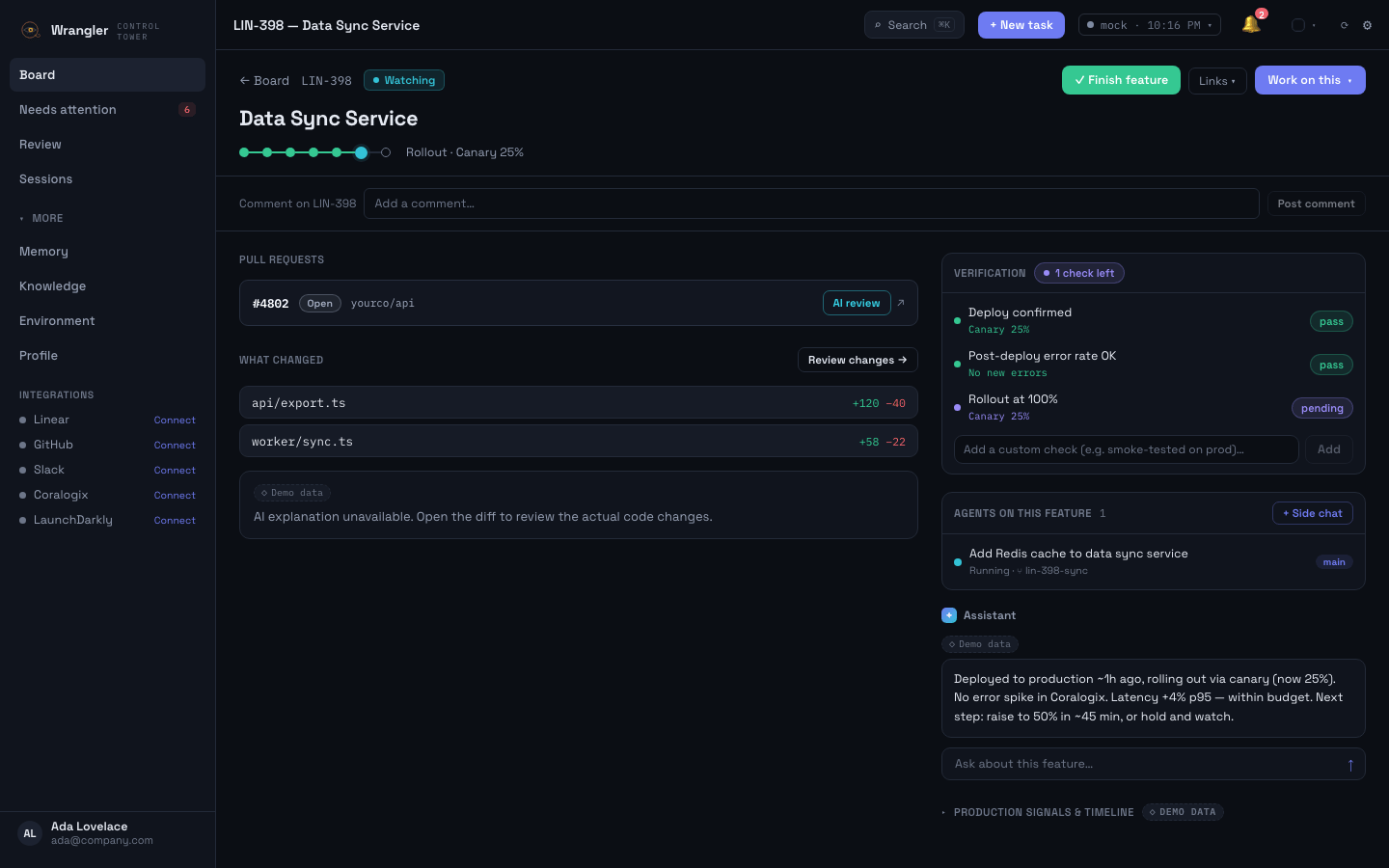
Verification
Deploy, rollout, and error-rate checks fill themselves from live data; the rest want evidence notes. The Verified stage stays shut until the list is green — and an override is recorded, not silent.
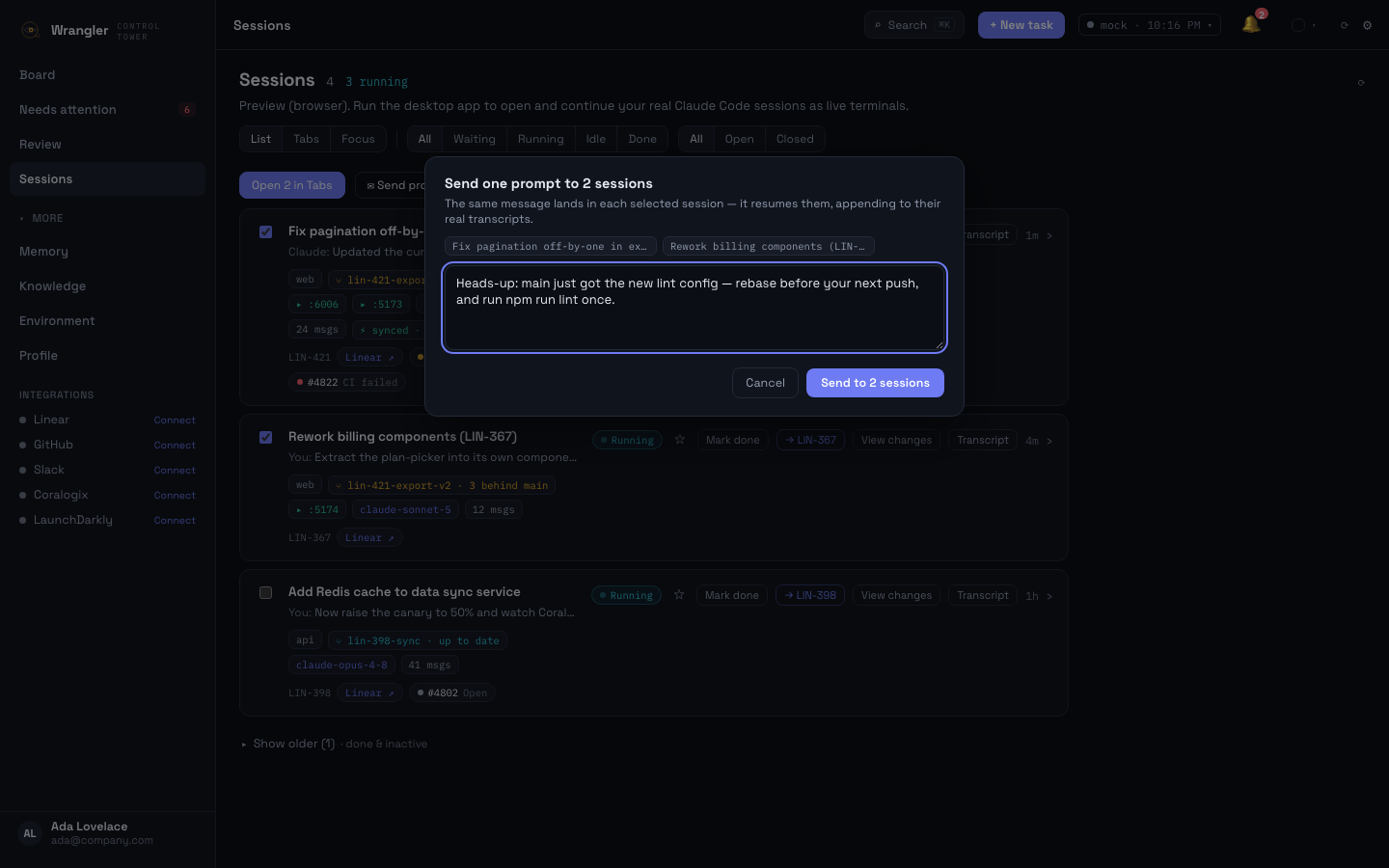
Broadcast
Rebase notices, convention changes, “stop and re-plan” — select any set of sessions and send one prompt to every one of them, instead of pasting it terminal by terminal.
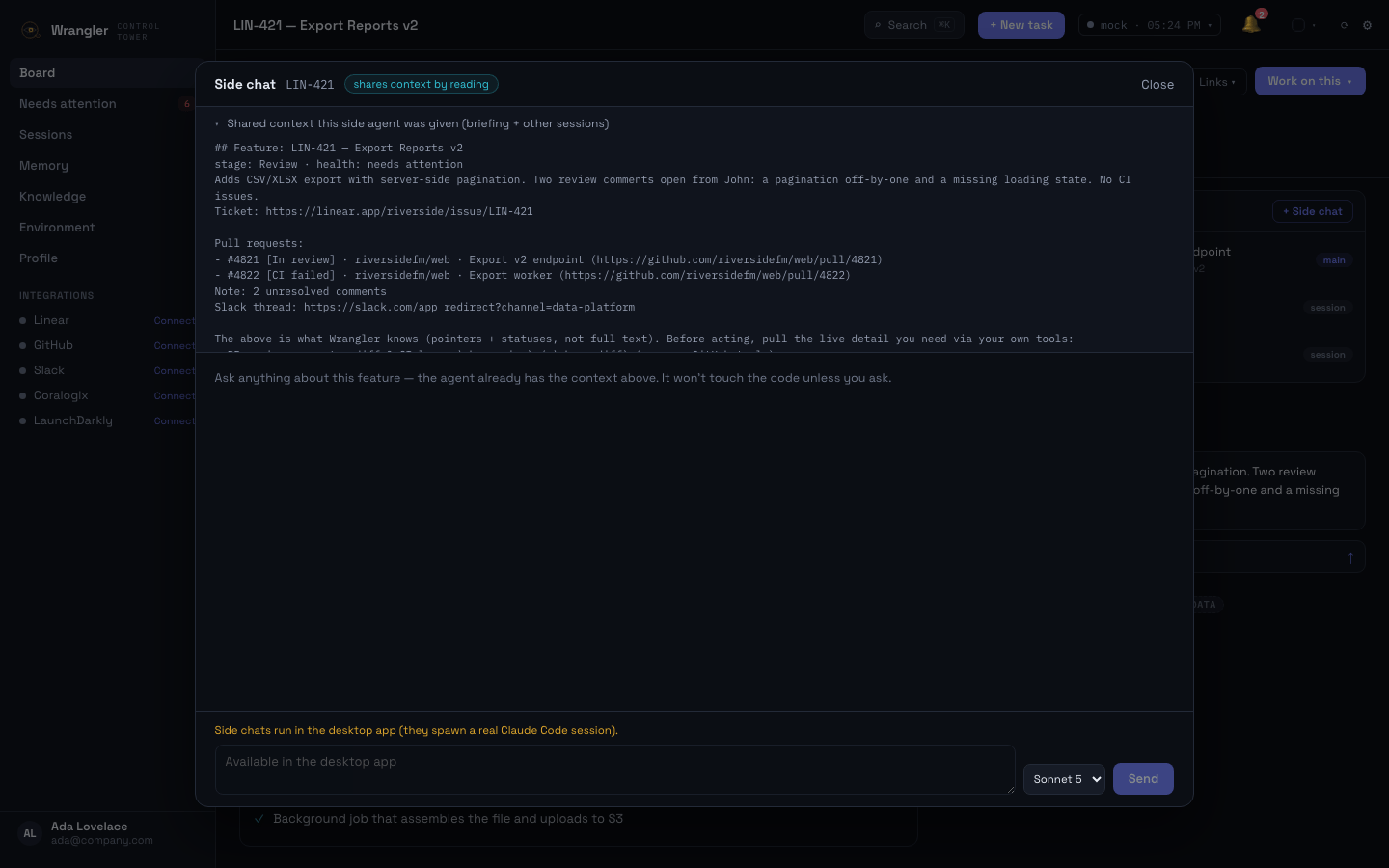
Side chat
Open a parallel session on the same feature — it reads the briefing, the other sessions, and the main transcript-so-far, so you can plan or ask without interrupting the run.
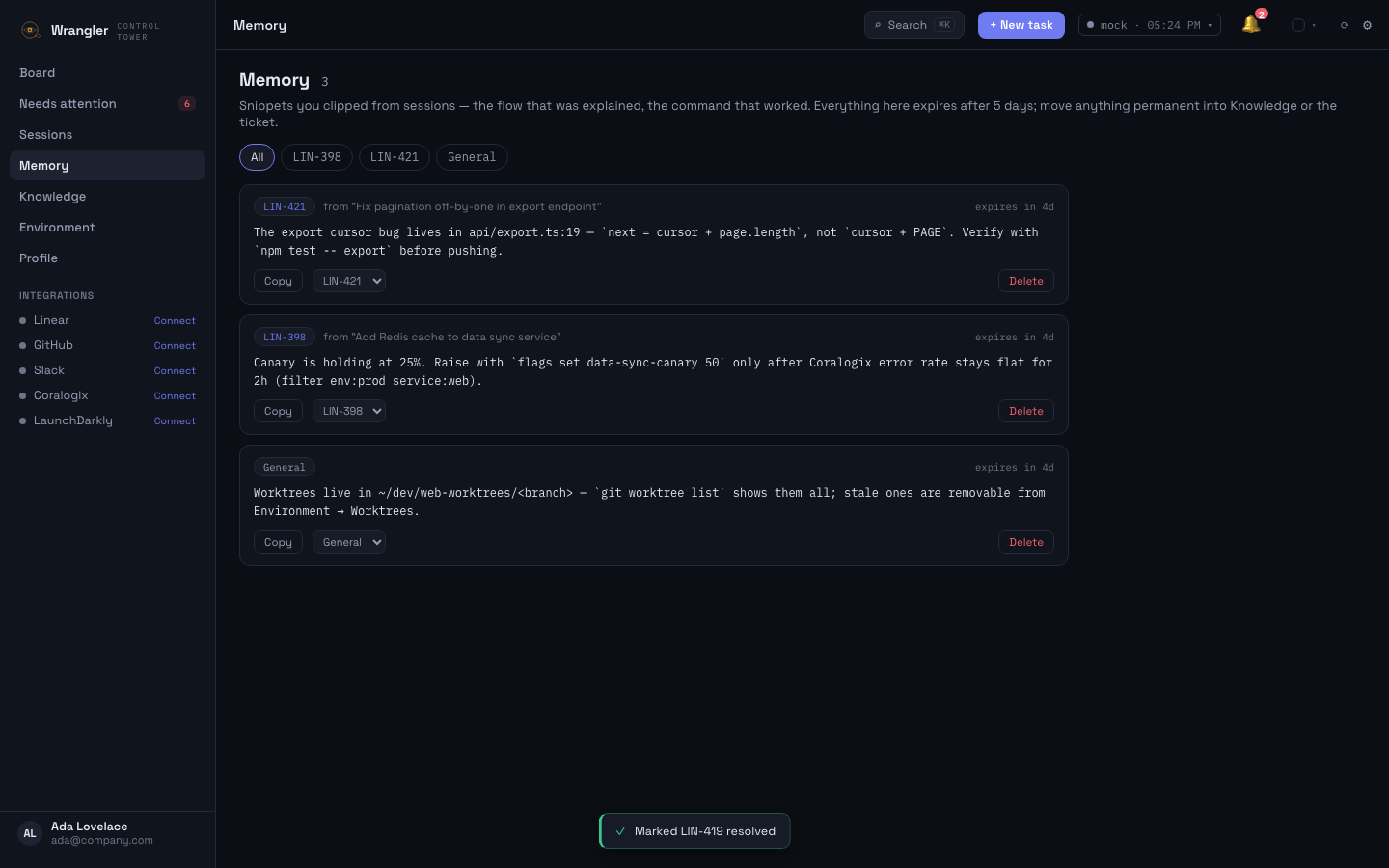
Memory
Select text in any session terminal and save it — the command that worked, the three files that matter. Kept 5 days, grouped by feature, gone before it becomes clutter.
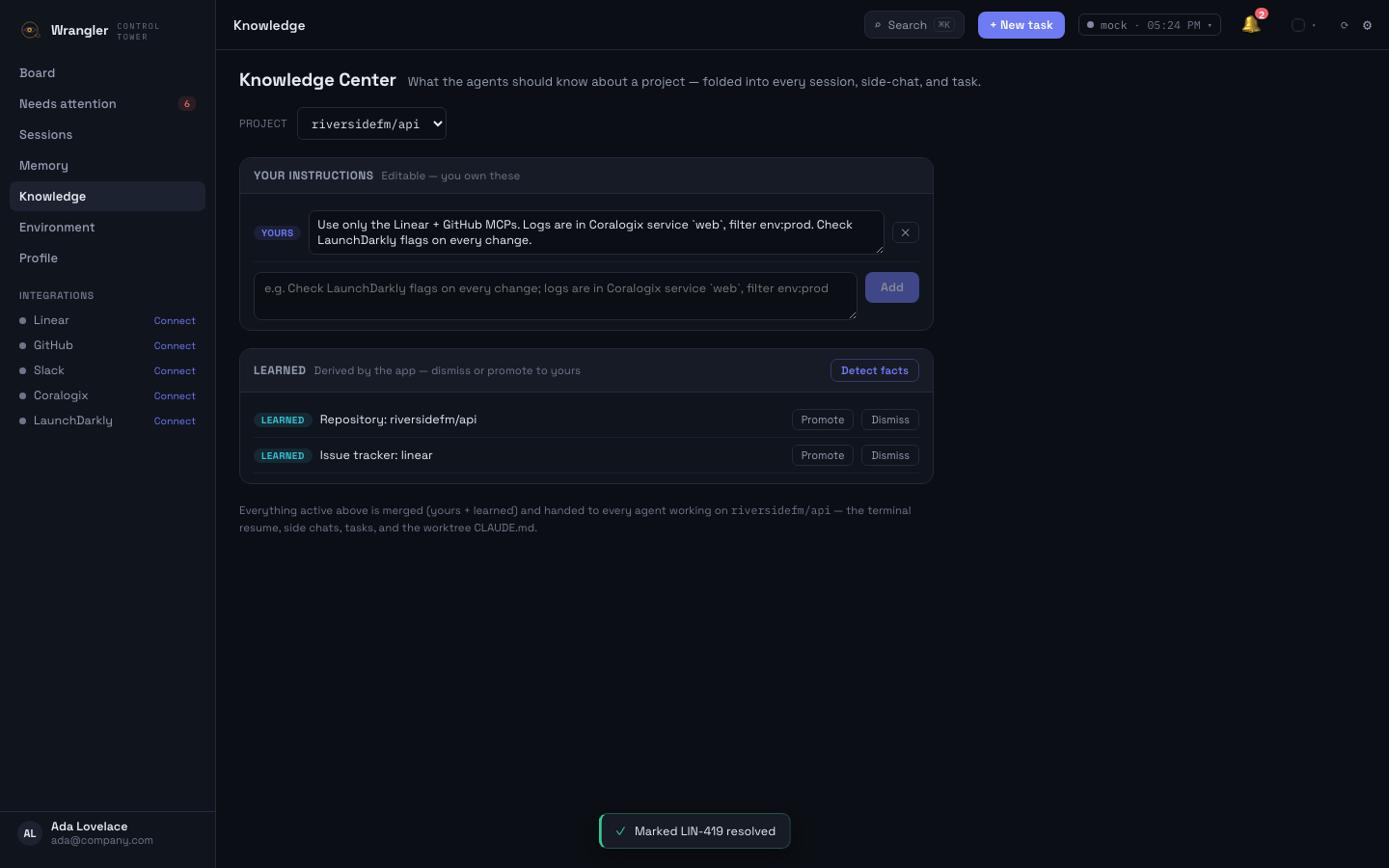
Knowledge Center
Your project conventions — where logs live, which flags to check — plus facts the app learns on its own, merged into every session, side chat, task, and worktree CLAUDE.md.
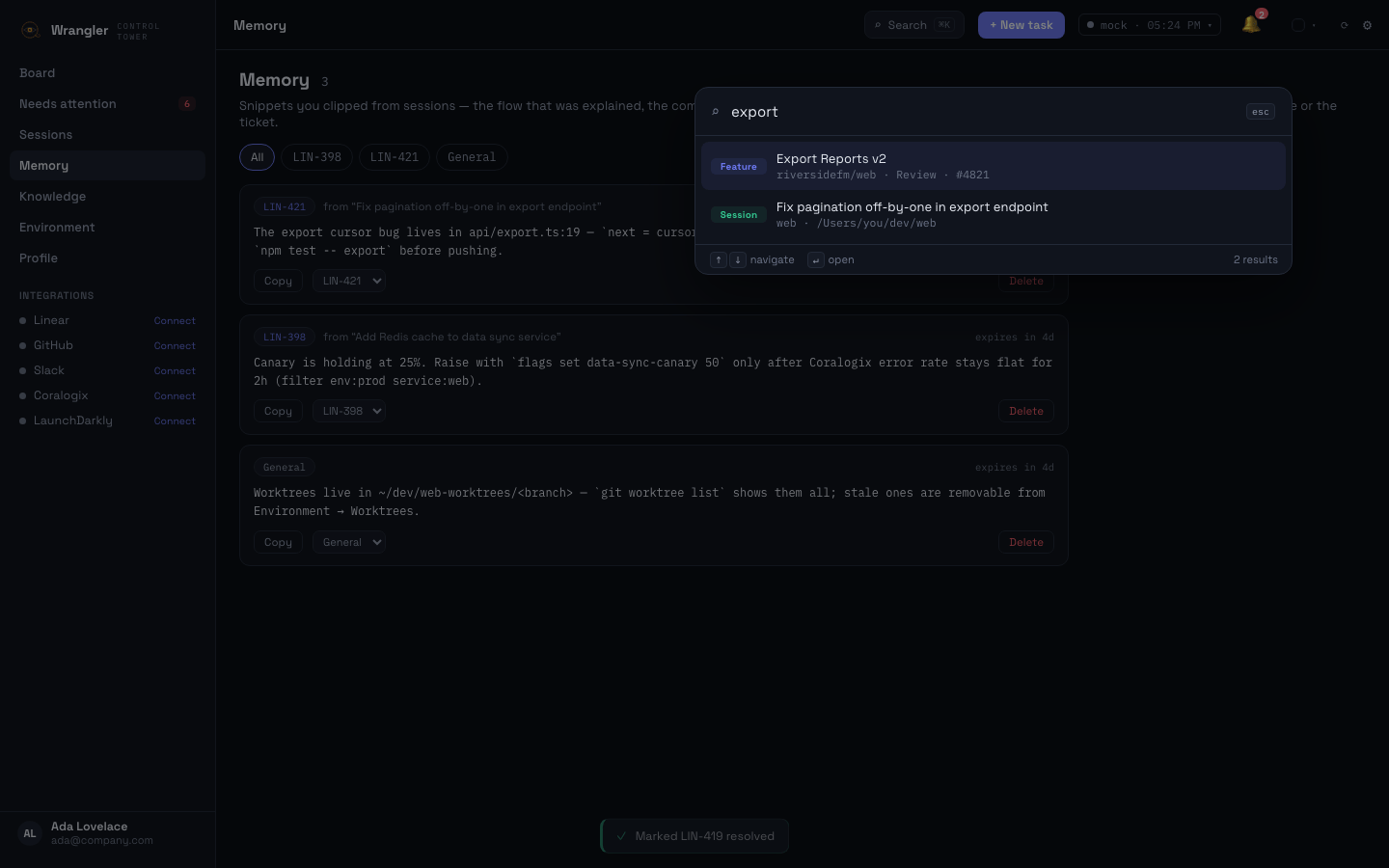
⌘K
Features, local tasks, agent sessions, and commands in one ranked list — by title, ticket id, repo, or branch. Enter jumps straight there.
05 / Field equipment
A
Wrangler joins each Linear ticket to its GitHub PR, its CI runs, and its rollout state — one reconciled row per feature instead of four half-truths in four tools.
B
Every agent session tracked in parallel. Working, idle, or blocked-on-you — with the exact thing it needs (an approval, an answer, a decision) surfaced up front.
C
Approve the PR, re-run the flaky CI job, reply to the Slack thread — right from the board. No tab safari, no "where was I?" tax when you get back.
D
Every open PR across every feature in one keyboard-first queue — j/k through them, AI-review the hard ones, mark the rest done. Marks expire on new commits, so nothing slips through stale.
E
A feature isn't done because the agent said so. When a session finishes, Wrangler runs your tests, lint, and typecheck in its worktree; an evidence-backed checklist — worktree checks green, deploy confirmed, rollout at 100%, error rate flat — gates the Verified stage, filled from live data where a tool is connected.
F
Full picture with GitHub alone — PRs, CI, deploys. Connect Linear and Slack when you want tickets and threads folded in too. Or run with zero integrations on local tasks. No all-or-nothing setup.
06 / Nothing ships unseen
Wrangler walks every feature through the full arc — and keeps its eye on the joins, because that's where surprises hide. The last stage is earned: an evidence-backed checklist — deploy confirmed, rollout at 100%, error rate flat — gates “Verified”, so done means observed done.
Planning
ticket scoped
Coding
agent on it
Review
PR approved
CI
green, verified
Deploy
shipped
Rollout
staged %
Verified
checklist green
caught before rollout
PR #1287 claims it closes LIN-291 — but the diff touches billing/ while the ticket scopes onboarding. Wrangler flags the mis-joined pair the moment it appears, not three days later in a post-mortem titled “how did that ship?”
07 / Saddle up
Wrangler adds no AI bill — it drives the subscriptions you already have.
New — Wrangler Cloud:your knowledge, tasks & settings sync to every device you ride.
The single-player core, no strings.
$0
forever
No account required — download and ride.
For the parallel-agent power user.
$10
per month · $96/yr · or $149 once (lifetime)
Every integration + cloud sync for ~5% of your agent bill.
Shared visibility for agent-fleet teams.
$15
per seat / month · 3 seats min · design-partner preview
Team is in design-partner preview — self-serve purchase opens when fleet visibility ships. Design partners ride free for 6 months.
🔒 Secure checkout by StripeNo card to downloadCancel or pause anytime14-day money-back guarantee
08 / Who we are
Wrangler started as a personal fix: one engineer running five parallel coding agents across Linear, GitHub, CI, and Slack — and losing an hour a day just working out what needed him.
So we built the control tower we wanted: a board that answers “what needs me right now?” in one glance, and gets out of the way the rest of the time. Wrangler is dogfooded daily — every feature on this page was shipped by agents wrangled inside Wrangler itself.
— the Wrangler crew · shipped from inside the app
Your code, your transcripts, and your board data live on your machine. Tokens go in the OS keychain and only ever travel to each service's own host through an allowlisted proxy. The only thing we see is anonymous usage analytics and crash reports — never code, never transcripts — and one toggle in Profile → Privacy turns it off.
You already pay for Claude Max, Cursor, or Codex. Wrangler drives those — it never resells AI or adds a per-token bill. The thing you pay us for is the tower, not the planes.
Session managers show you terminals. Wrangler reconciles the work — the ticket, the PR, the CI run, the rollout — because "is this feature actually done?" is the question that matters at the end of the day.
09 / Get Wrangler
Free to download — the core is free forever. Two minutes from DMG to a board that knows what needs you.
macOS 13+ · signed & notarized by Apple · auto-updates built in
Windows & Linux: Q4 2026
or ⧉
One click grabs the right build for your Mac — Apple Silicon or Intel. Prefer Homebrew? Same app, same auto-updates.
First launch runs a 2-minute onboarding: connect GitHub (your gh login is auto-detected), pick Linear or Jira, confirm who you are.
Paste a ticket, pick a repo, hit Start session. Updates arrive automatically from then on — the app offers “Restart & update” when a new version ships.
You'll want: git · one coding-agent CLI (Claude Code recommended) · gh for zero-config GitHub · tmux if you want sessions that survive quitting the app.
No. Wrangler is local-first: tokens live in the macOS Keychain and requests go only to each service's own host through an allowlisted proxy. We collect anonymous feature-usage analytics and crash reports (never your code, no screen recording — see the privacy policy), and you can turn usage analytics off in Profile → Privacy.
Claude Code first-class (live terminals, resume, headless jobs), plus Codex, Cursor, Gemini, OpenCode, Grok, and 30+ more. Headless one-click fix/review works with any agent that has an autonomous CLI mode.
No — that's the point. Wrangler drives the agent subscriptions you already pay for. It adds zero AI cost of its own.
macOS ships first (it's where we dogfood daily). The app is built on Tauri, so Windows and Linux are a packaging job, not a rewrite — builds are targeted for Q4 2026.
Team is currently in a design-partner preview — self-serve purchase is paused until fleet visibility, the tier's headline feature, ships. Design partners get 6 months free (planned pricing: $15/seat/month, 3-seat minimum) and shape what we build — email support@support.wrangler-control.com to apply. The mechanics are already built and existing Team licenses keep working: invite teammates by email, each accepted invite gets Pro entitlements instantly, and the owner manages seats and billing in one place.
Your first purchase has a 14-day money-back guarantee — email support@support.wrangler-control.com and we refund in full, no questions asked. The core stays free forever, so you can try Wrangler before paying anything.
10 / Support
Questions, bugs, feedback — send a note and we'll reply to your email.